|
此版本仍在开发中,目前尚不被视为稳定版本。如需最新稳定版本,请使用 spring-cloud-contract 5.0.2! |
开发您的首个基于 Spring Cloud Contract 的应用程序
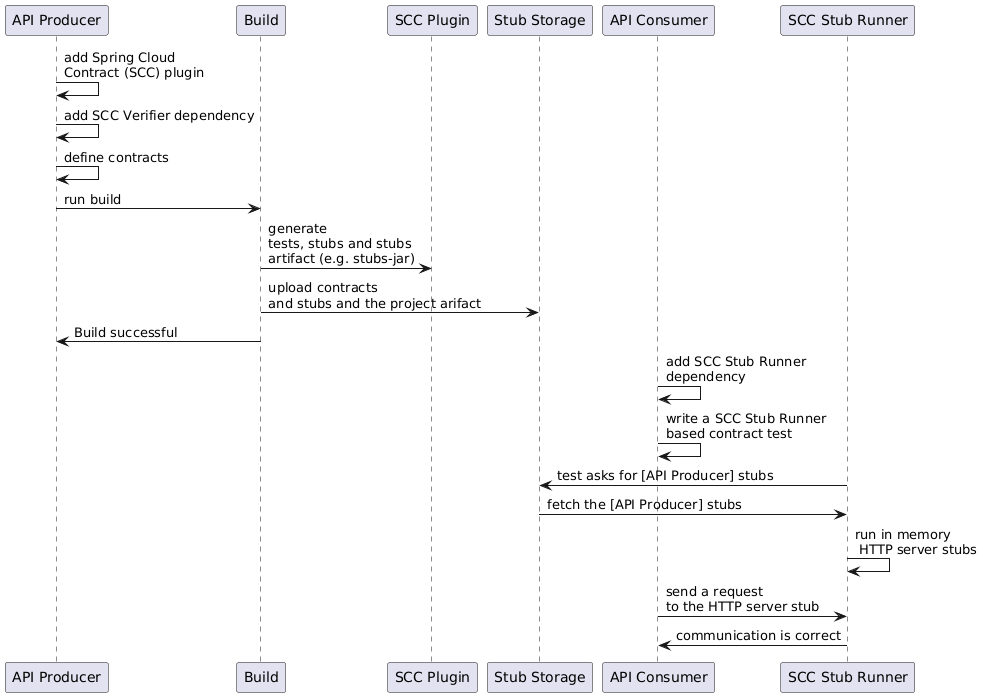
在生产者端
要开始使用 Spring Cloud Contract,您可以在构建文件中添加 Spring Cloud Contract Verifier 依赖项和插件,如下例所示:
以下列表显示了如何添加插件,该插件应放置在文件的 build/plugins 部分中:
<plugin>
	<groupId>org.springframework.cloud</groupId>
	<artifactId>spring-cloud-contract-maven-plugin</artifactId>
	<version>${spring-cloud-contract.version}</version>
	<extensions>true</extensions>
</plugin>|
最简单的入门方式是前往 Spring Initializr,并添加“Web”和“Contract Verifier”作为依赖项。这样做会引入前述所提及的依赖项以及 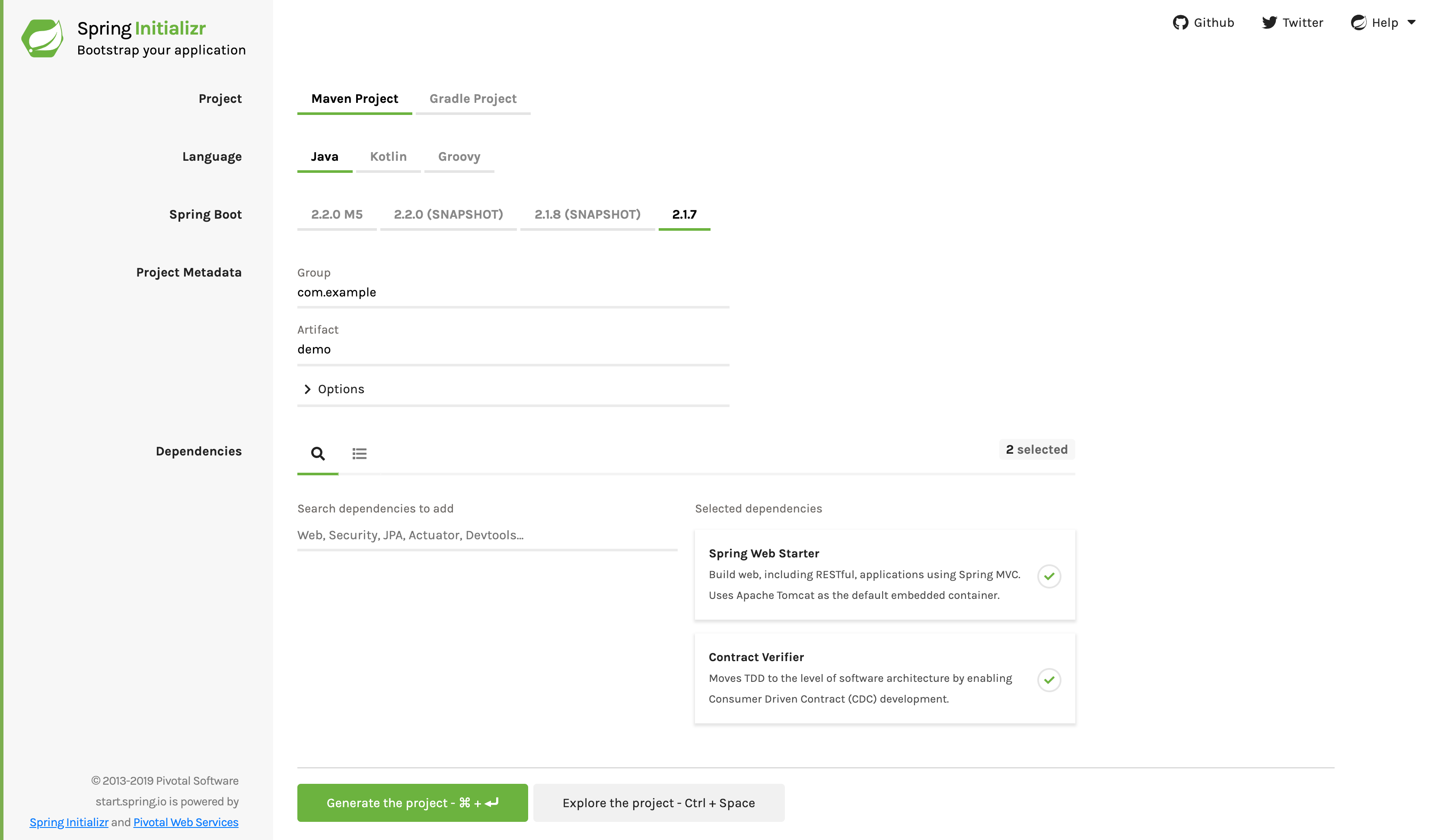
|
现在,您可以将使用 REST/ 消息契约(以 Groovy DSL 或 YAML 格式表达)的文件添加到 contracts 目录中,该目录由 contractsDslDir 属性设置。默认情况下,它为 $rootDir/src/test/resources/contracts。
请注意,文件名并不重要。您可按任意命名方案在该目录内组织您的契约。
对于 HTTP 模拟(stubs),契约定义了在给定请求条件下应返回何种响应(考虑 HTTP 方法、URL、头信息、状态码等)。以下示例展示了以 Groovy 和 YAML 格式编写的 HTTP 模拟契约:
- Groovy
-
org.springframework.cloud.contract.spec.Contract.make { request { method 'PUT' url '/fraudcheck' body([ "client.id": $(regex('[0-9]{10}')), loanAmount: 99999 ]) headers { contentType('application/json') } } response { status OK() body([ fraudCheckStatus: "FRAUD", "rejection.reason": "Amount too high" ]) headers { contentType('application/json') } } } - YAML
-
request:
  method: PUT
  url: /fraudcheck
  body:
    "client.id": 1234567890
    loanAmount: 99999
  headers:
    Content-Type: application/json
  matchers:
    body:
      - path: $.['client.id']
        type: by_regex
        value: "[0-9]{10}"
response:
  status: 200
  body:
    fraudCheckStatus: "FRAUD"
    "rejection.reason": "Amount too high"
  headers:
    Content-Type: application/json;charset=UTF-8
如果您需要使用消息传递功能,可以定义:
-
输入和输出消息(考虑其发送来源、消息体以及头部信息)。
-
消息接收后应调用的方法。
-
当被调用时,应触发消息的方法。
-
以下示例显示了一个 Camel 消息契约:
- Groovy
-
def contractDsl = Contract.make { name "foo" label 'some_label' input { triggeredBy('bookReturnedTriggered()') } outputMessage { sentTo('activemq:output') body('''{ "bookName" : "foo" }''') headers { header('BOOK-NAME', 'foo') messagingContentType(applicationJson()) } } } - YAML
-
label: some_label
input:
  triggeredBy: bookReturnedTriggered
outputMessage:
  sentTo: activemq:output
  body:
    bookName: foo
  headers:
    BOOK-NAME: foo
    contentType: application/json
运行 ./mvnw clean install 会自动生成测试用例,以验证应用程序对新增契约的合规性。默认情况下,生成的测试位于 org.springframework.cloud.contract.verifier.tests.。
生成的测试可能因您在插件中设置的框架和测试类型不同而有所差异。
在下一个列表中,您可以找到:
-
HTTP契约的默认测试模式为
MockMvc -
A JAX-RS 客户端,采用
JAXRS测试模式 -
A
WebTestClient-based test (this is particularly recommended while working with Reactive,Web-Flux-based applications) set with theWEBTESTCLIENTtest mode
| 您只需选择其中一种测试框架。MockMvc 是默认选项。若要使用其他框架,请将其库添加到您的类路径中。 |
以下列表展示了所有框架的示例:
- MockMvc
-
@Test public void validate_shouldMarkClientAsFraud() throws Exception { // given: MockMvcRequestSpecification request = given() .header("Content-Type", "application/vnd.fraud.v1+json") .body("{\"client.id\":\"1234567890\",\"loanAmount\":99999}"); // when: ResponseOptions response = given().spec(request) .put("/fraudcheck"); // then: assertThat(response.statusCode()).isEqualTo(200); assertThat(response.header("Content-Type")).matches("application/vnd.fraud.v1.json.*"); // and: DocumentContext parsedJson = JsonPath.parse(response.getBody().asString()); assertThatJson(parsedJson).field("['fraudCheckStatus']").matches("[A-Z]{5}"); assertThatJson(parsedJson).field("['rejection.reason']").isEqualTo("Amount too high"); } - jaxrs
-
public class FooTest { WebTarget webTarget; @Test public void validate_() throws Exception { // when: Response response = webTarget .path("/users") .queryParam("limit", "10") .queryParam("offset", "20") .queryParam("filter", "email") .queryParam("sort", "name") .queryParam("search", "55") .queryParam("age", "99") .queryParam("name", "Denis.Stepanov") .queryParam("email", "[email protected]") .request() .build("GET") .invoke(); String responseAsString = response.readEntity(String.class); // then: assertThat(response.getStatus()).isEqualTo(200); // and: DocumentContext parsedJson = JsonPath.parse(responseAsString); assertThatJson(parsedJson).field("['property1']").isEqualTo("a"); } } - WebTestClient
-
@Test
	public void validate_shouldRejectABeerIfTooYoung() throws Exception {
		// given:
			WebTestClientRequestSpecification request = given()
					.header("Content-Type", "application/json")
					.body("{\"age\":10}");

		// when:
			WebTestClientResponse response = given().spec(request)
					.post("/check");

		// then:
			assertThat(response.statusCode()).isEqualTo(200);
			assertThat(response.header("Content-Type")).matches("application/json.*");
		// and:
			DocumentContext parsedJson = JsonPath.parse(response.getBody().asString());
			assertThatJson(parsedJson).field("['status']").isEqualTo("NOT_OK");
	}
由于尚未实现由契约所描述的功能,测试失败。
要使它们通过,您必须添加正确的实现以处理HTTP请求或消息。此外,您还必须将一个基础测试类添加到项目中,该类供自动生成的测试使用。所有自动生成的测试都继承自该类,其中应包含运行这些测试所需的所有设置信息(例如,RestAssuredMockMvc 控制器设置或消息测试设置)。
以下示例来自 pom.xml,展示了如何指定基础测试类:
<build>
        <plugins>
            <plugin>
                <groupId>org.springframework.cloud</groupId>
                <artifactId>spring-cloud-contract-maven-plugin</artifactId>
                <version>2.1.2.RELEASE</version>
                <extensions>true</extensions>
                <configuration>
                    <baseClassForTests>com.example.contractTest.BaseTestClass</baseClassForTests> (1)
                </configuration>
            </plugin>
            <plugin>
                <groupId>org.springframework.boot</groupId>
                <artifactId>spring-boot-maven-plugin</artifactId>
            </plugin>
        </plugins>
</build>| 1 | 元素让您能够指定基础测试类。它必须是 configuration 元素的子元素,而该 configuration 元素又需位于 spring-cloud-contract-maven-plugin 元素内部。 |
以下示例显示了一个最小(但功能完整)的基础测试类:
package com.example.contractTest;

import org.junit.Before;

import io.restassured.module.mockmvc.RestAssuredMockMvc;

public class BaseTestClass {

	@Before
	public void setup() {
		RestAssuredMockMvc.standaloneSetup(new FraudController());
	}
}
这个最简化的类实际上就是您所需的一切,可使您的测试正常运行。它作为起点,自动生成功能测试将附加于此。
现在我们可以继续进行实现。为此,我们首先需要一个数据类,然后在我们的控制器中使用它。以下列表显示了该数据类:
package com.example.Test;

import com.fasterxml.jackson.annotation.JsonProperty;

public class LoanRequest {

	@JsonProperty("client.id")
	private String clientId;

	private Long loanAmount;

	public String getClientId() {
		return clientId;
	}

	public void setClientId(String clientId) {
		this.clientId = clientId;
	}

	public Long getLoanAmount() {
		return loanAmount;
	}

	public void setLoanRequestAmount(Long loanAmount) {
		this.loanAmount = loanAmount;
	}
}
前面的类提供了一个对象,我们可以在其中存储参数。由于合同中的客户端 ID 被称为 client.id,我们需要使用 @JsonProperty("client.id") 参数将其映射到 clientId 字段。
现在我们可以继续讨论控制器,如下列表所示:
package com.example.docTest;

import org.springframework.web.bind.annotation.PutMapping;
import org.springframework.web.bind.annotation.RequestBody;
import org.springframework.web.bind.annotation.RestController;

@RestController
public class FraudController {

	@PutMapping(value = "/fraudcheck", consumes="application/json", produces="application/json")
	public String check(@RequestBody LoanRequest loanRequest) { (1)

		if (loanRequest.getLoanAmount() > 10000) { (2)
			return "{fraudCheckStatus: FRAUD, rejection.reason: Amount too high}"; (3)
		} else {
			return "{fraudCheckStatus: OK, acceptance.reason: Amount OK}"; (4)
		}
	}
}| 1 | 我们映射传入参数到一个LoanRequest对象。 |
| 2 | 我们检查所需的贷款金额,以确保不会过多。 |
| 3 | 如果太多了,我们返回JSON(在这里用一个简单字符串创建)... |
| 4 | 如果我们有一个测试来捕捉当金额是允许的时候,我们可以匹配这个输出。 |
the FraudController is about as simple as things get. you can do much more, including
logging, validating the client id, and so on.
一旦实现和测试基类到位,测试就会通过,应用程序和存根 artifact 构建并安装在本地 Maven 仓库中。 有关将存根 jar 安装到本地存储库的信息显示在日志中,如下面的示例所示:
[INFO] --- spring-cloud-contract-maven-plugin:1.0.0.BUILD-SNAPSHOT:generateStubs (default-generateStubs) @ http-server ---
[INFO] Building jar: /some/path/http-server/target/http-server-0.0.1-SNAPSHOT-stubs.jar
[INFO]
[INFO] --- maven-jar-plugin:2.6:jar (default-jar) @ http-server ---
[INFO] Building jar: /some/path/http-server/target/http-server-0.0.1-SNAPSHOT.jar
[INFO]
[INFO] --- spring-boot-maven-plugin:1.5.5.BUILD-SNAPSHOT:repackage (default) @ http-server ---
[INFO]
[INFO] --- maven-install-plugin:2.5.2:install (default-install) @ http-server ---
[INFO] Installing /some/path/http-server/target/http-server-0.0.1-SNAPSHOT.jar to /path/to/your/.m2/repository/com/example/http-server/0.0.1-SNAPSHOT/http-server-0.0.1-SNAPSHOT.jar
[INFO] Installing /some/path/http-server/pom.xml to /path/to/your/.m2/repository/com/example/http-server/0.0.1-SNAPSHOT/http-server-0.0.1-SNAPSHOT.pom
[INFO] Installing /some/path/http-server/target/http-server-0.0.1-SNAPSHOT-stubs.jar to /path/to/your/.m2/repository/com/example/http-server/0.0.1-SNAPSHOT/http-server-0.0.1-SNAPSHOT-stubs.jar
现在您可以合并这些更改并在线发布应用和存根 artifact。
在消费者端
你可以使用 Spring Cloud Contract Stub Runner 在集成测试中获取一个正在运行的 WireMock 实例或消息路由,以模拟实际服务。
要开始,请在 Spring Cloud Contract Stub Runner 中添加依赖,如下所示:
您可以通过以下两种方式之一,将生产者端存根安装到您的Maven仓库中:
-
By checking out the Producer side repository and adding contracts and generating the stubs by running the following commands:
$ cd local-http-server-repo
$ ./mvnw clean install -DskipTests
The tests are skipped because the Producer-side contract implementation is not yet in place, so the automatically-generated contract tests fail. -
通过从远程存储库获取现有生产者服务存根。为此,
请将存根存档 ID 和存档库 URL 作为0属性传递,如下面的示例所示:
现在您可以使用 @AutoConfigureStubRunner 在测试类上进行注解。在注解中,
为 group-id 和 artifact-id 提供 Spring Cloud Contract Stub Runner,以便为您自动运行合作者的存档,如下面的例子所示:
@RunWith(SpringRunner.class)
@SpringBootTest(webEnvironment=WebEnvironment.NONE)
@AutoConfigureStubRunner(ids = {"com.example:http-server-dsl:+:stubs:6565"},
		stubsMode = StubRunnerProperties.StubsMode.LOCAL)
public class LoanApplicationServiceTests {
	. . .
}
在从在线仓库下载存根时使用 REMOTE 和 stubsMode,而在离线工作时使用 LOCAL。 |
在你的集成测试中,您可以接收来自合作者服务预期发出的HTTP响应或消息的存根版本。您可以在构建日志中看到类似的条目:
2016-07-19 14:22:25.403  INFO 41050 --- [           main] o.s.c.c.stubrunner.AetherStubDownloader  : Desired version is + - will try to resolve the latest version
2016-07-19 14:22:25.438  INFO 41050 --- [           main] o.s.c.c.stubrunner.AetherStubDownloader  : Resolved version is 0.0.1-SNAPSHOT
2016-07-19 14:22:25.439  INFO 41050 --- [           main] o.s.c.c.stubrunner.AetherStubDownloader  : Resolving artifact com.example:http-server:jar:stubs:0.0.1-SNAPSHOT using remote repositories []
2016-07-19 14:22:25.451  INFO 41050 --- [           main] o.s.c.c.stubrunner.AetherStubDownloader  : Resolved artifact com.example:http-server:jar:stubs:0.0.1-SNAPSHOT to /path/to/your/.m2/repository/com/example/http-server/0.0.1-SNAPSHOT/http-server-0.0.1-SNAPSHOT-stubs.jar
2016-07-19 14:22:25.465  INFO 41050 --- [           main] o.s.c.c.stubrunner.AetherStubDownloader  : Unpacking stub from JAR [URI: file:/path/to/your/.m2/repository/com/example/http-server/0.0.1-SNAPSHOT/http-server-0.0.1-SNAPSHOT-stubs.jar]
2016-07-19 14:22:25.475  INFO 41050 --- [           main] o.s.c.c.stubrunner.AetherStubDownloader  : Unpacked file to [/var/folders/0p/xwq47sq106x1_g3dtv6qfm940000gq/T/contracts100276532569594265]
2016-07-19 14:22:27.737  INFO 41050 --- [           main] o.s.c.c.stubrunner.StubRunnerExecutor    : All stubs are now running RunningStubs [namesAndPorts={com.example:http-server:0.0.1-SNAPSHOT:stubs=8080}]