|
对于最新的稳定版本,请使用 spring-cloud-contract 5.0.0! |
开发您的第一个基于Spring Cloud的合同应用
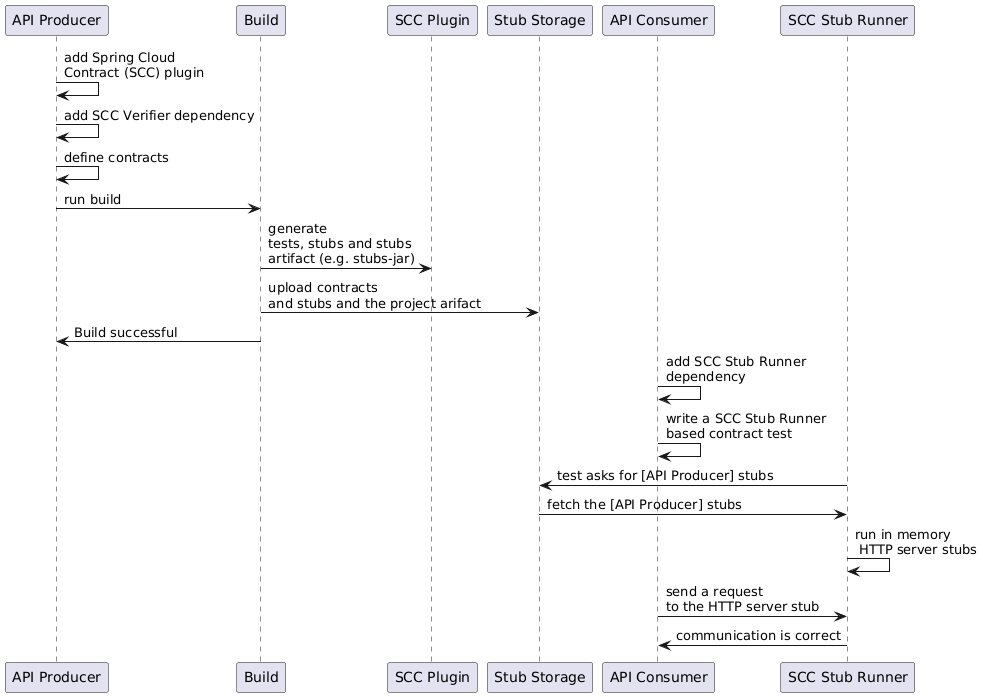
在制作人方面
开始合作春云合约你可以添加Spring Cloud合约验证器
依赖和插件,如下示例所示:
下面的列表展示了如何添加插件,应该放在构建/插件中 文件部分:
<plugin>
	<groupId>org.springframework.cloud</groupId>
	<artifactId>spring-cloud-contract-maven-plugin</artifactId>
	<version>${spring-cloud-contract.version}</version>
	<extensions>true</extensions>
</plugin>|
最简单的入门方式是进入 Spring Initializr,添加“Web”和“Contract Verifier”作为依赖。这样做会把之前的部分拉进来
提到了依赖以及你需要的其他所有需求 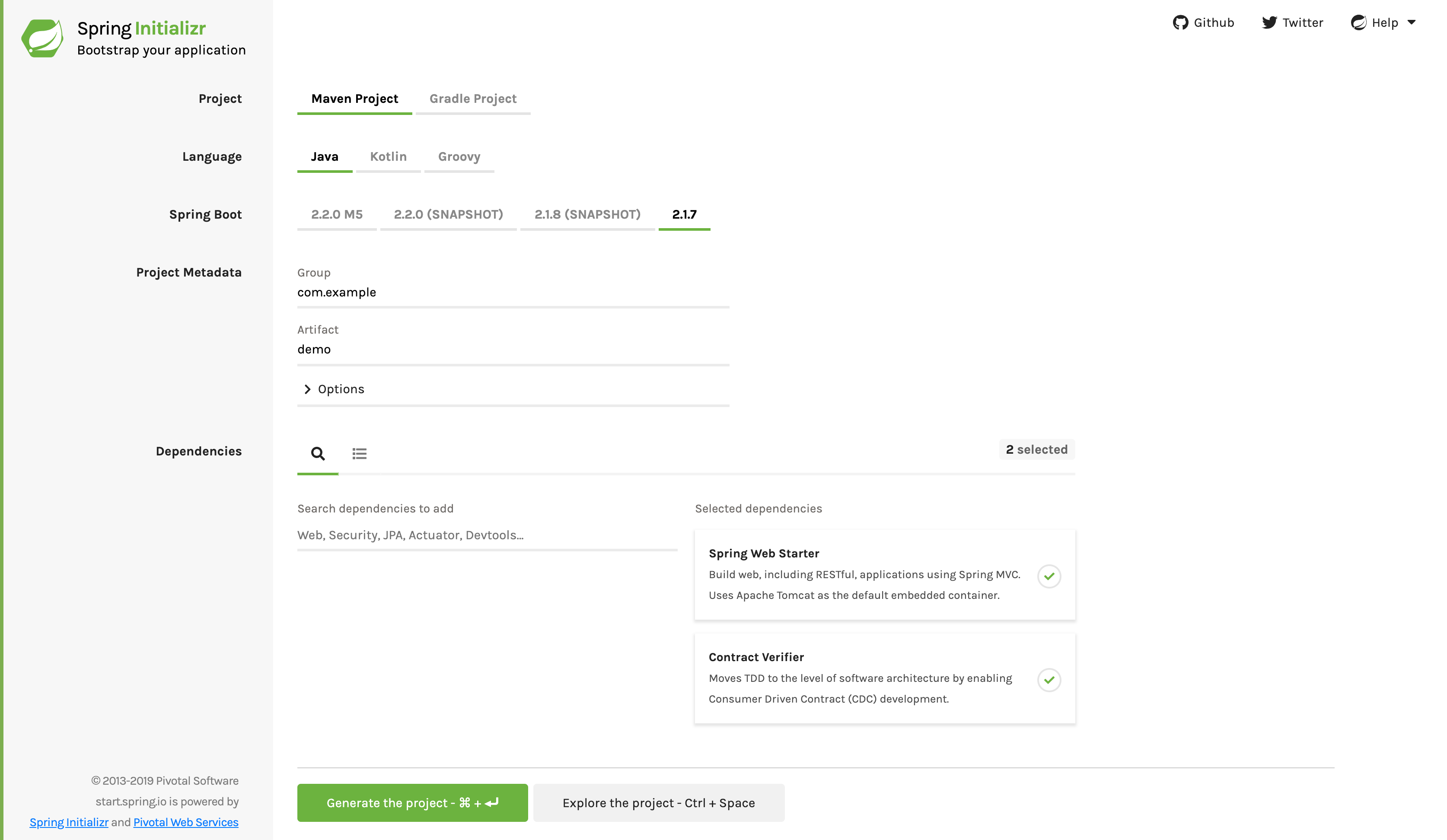
|
现在你可以添加文件休息/消息合约
通过Groovy DSL或YAML表达到契约目录,该目录由contractsDslDir财产。默认情况下,它是$rootDir/src/测试/资源/合同.
请注意,文件名并不重要。你可以在这里组织你的合同
目录里有你喜欢的命名方式。
对于 HTTP 存根,契约定义了应返回何种响应 给定请求(考虑HTTP方法、URL、头部、状态码等) 在)。以下示例展示了Groovy和YAML中的HTTP存根合同:
- 槽的
-
org.springframework.cloud.contract.spec.Contract.make { request { method 'PUT' url '/fraudcheck' body([ "client.id": $(regex('[0-9]{10}')), loanAmount: 99999 ]) headers { contentType('application/json') } } response { status OK() body([ fraudCheckStatus: "FRAUD", "rejection.reason": "Amount too high" ]) headers { contentType('application/json') } } } - YAML音乐
-
request:
  method: PUT
  url: /fraudcheck
  body:
    "client.id": 1234567890
    loanAmount: 99999
  headers:
    Content-Type: application/json
  matchers:
    body:
      - path: $.['client.id']
        type: by_regex
        value: "[0-9]{10}"
response:
  status: 200
  body:
    fraudCheckStatus: "FRAUD"
    "rejection.reason": "Amount too high"
  headers:
    Content-Type: application/json;charset=UTF-8
如果你需要使用消息,可以定义:
-
输入和输出消息(考虑发送地点、消息正文和头部)。
-
收到消息后应调用的方法。
-
这些方法在调用时应该触发消息。
-
以下示例展示了Camel消息合约:
- 槽的
-
def contractDsl = Contract.make { name "foo" label 'some_label' input { triggeredBy('bookReturnedTriggered()') } outputMessage { sentTo('activemq:output') body('''{ "bookName" : "foo" }''') headers { header('BOOK-NAME', 'foo') messagingContentType(applicationJson()) } } } - YAML音乐
-
label: some_label
input:
  triggeredBy: bookReturnedTriggered
outputMessage:
  sentTo: activemq:output
  body:
    bookName: foo
  headers:
    BOOK-NAME: foo
    contentType: application/json
运行./mvnw 干净安装自动生成测试以验证应用是否符合新增的合同。默认情况下,生成的测试在org.springframework.cloud.contract.verifier.tests..
生成的测试可能会有所不同,取决于你设置的框架和测试类型在你的插件中。
在下一个列表中,你可以找到:
-
HTTP合同的默认测试模式
莫克麦克 -
一个带有
JAXRS测试模式 -
一个
WebTestClient基于检验(尤其推荐在处理 反应性的网流-基于应用的集合,并WEBTESTCLIENT测试模式
| 你只需要这些测试框架中的一个。MockMvc 是默认的。要使用其中一个其他框架,将它的库添加到你的类路径中。 |
以下列表展示了所有框架的示例:
- 莫克姆维克
-
@Test public void validate_shouldMarkClientAsFraud() throws Exception { // given: MockMvcRequestSpecification request = given() .header("Content-Type", "application/vnd.fraud.v1+json") .body("{\"client.id\":\"1234567890\",\"loanAmount\":99999}"); // when: ResponseOptions response = given().spec(request) .put("/fraudcheck"); // then: assertThat(response.statusCode()).isEqualTo(200); assertThat(response.header("Content-Type")).matches("application/vnd.fraud.v1.json.*"); // and: DocumentContext parsedJson = JsonPath.parse(response.getBody().asString()); assertThatJson(parsedJson).field("['fraudCheckStatus']").matches("[A-Z]{5}"); assertThatJson(parsedJson).field("['rejection.reason']").isEqualTo("Amount too high"); } - JAXRS
-
public class FooTest { WebTarget webTarget; @Test public void validate_() throws Exception { // when: Response response = webTarget .path("/users") .queryParam("limit", "10") .queryParam("offset", "20") .queryParam("filter", "email") .queryParam("sort", "name") .queryParam("search", "55") .queryParam("age", "99") .queryParam("name", "Denis.Stepanov") .queryParam("email", "[email protected]") .request() .build("GET") .invoke(); String responseAsString = response.readEntity(String.class); // then: assertThat(response.getStatus()).isEqualTo(200); // and: DocumentContext parsedJson = JsonPath.parse(responseAsString); assertThatJson(parsedJson).field("['property1']").isEqualTo("a"); } } - WebTestclient
-
@Test
	public void validate_shouldRejectABeerIfTooYoung() throws Exception {
		// given:
			WebTestClientRequestSpecification request = given()
					.header("Content-Type", "application/json")
					.body("{\"age\":10}");

		// when:
			WebTestClientResponse response = given().spec(request)
					.post("/check");

		// then:
			assertThat(response.statusCode()).isEqualTo(200);
			assertThat(response.header("Content-Type")).matches("application/json.*");
		// and:
			DocumentContext parsedJson = JsonPath.parse(response.getBody().asString());
			assertThatJson(parsedJson).field("['status']").isEqualTo("NOT_OK");
	}
由于合同中描述的功能尚未实现 在场时,测试失败。
要让它们通过,你必须添加正确的实现来处理HTTP请求或消息。此外,你必须为自动生成的测试添加一个基础测试类。该类由所有自动生成的测试扩展,并且应当包含运行这些测试所需的所有设置信息(例如,安心莫克Mvc控制器设置或消息测试设置)。
以下示例来自pom.xml,展示了如何指定基测试类:
<build>
        <plugins>
            <plugin>
                <groupId>org.springframework.cloud</groupId>
                <artifactId>spring-cloud-contract-maven-plugin</artifactId>
                <version>2.1.2.RELEASE</version>
                <extensions>true</extensions>
                <configuration>
                    <baseClassForTests>com.example.contractTest.BaseTestClass</baseClassForTests> (1)
                </configuration>
            </plugin>
            <plugin>
                <groupId>org.springframework.boot</groupId>
                <artifactId>spring-boot-maven-plugin</artifactId>
            </plugin>
        </plugins>
</build>| 1 | 这baseClassForTestselement 可以让你指定基础测试类。一定是个孩子
一配置元素Spring-cloud-contract-maven-plugin. |
以下示例展示了一个最小(但函数式)的基测试类:
package com.example.contractTest;

import org.junit.Before;

import io.restassured.module.mockmvc.RestAssuredMockMvc;

public class BaseTestClass {

	@Before
	public void setup() {
		RestAssuredMockMvc.standaloneSetup(new FraudController());
	}
}
这个最小类实际上就是你让测试正常工作的全部。它作为自动生成测试附加的起点。
现在我们可以进入实现部分。为此,我们首先需要一个数据类,然后在我们的控制器中使用它。以下列表展示了数据类:
package com.example.Test;

import com.fasterxml.jackson.annotation.JsonProperty;

public class LoanRequest {

	@JsonProperty("client.id")
	private String clientId;

	private Long loanAmount;

	public String getClientId() {
		return clientId;
	}

	public void setClientId(String clientId) {
		this.clientId = clientId;
	}

	public Long getLoanAmount() {
		return loanAmount;
	}

	public void setLoanRequestAmount(Long loanAmount) {
		this.loanAmount = loanAmount;
	}
}前一类提供了一个可以存储参数的对象。因为合同中的客户端ID被调用client.id,我们需要使用@JsonProperty(“client.id”)参数 以映射到客户标识田。
现在我们可以进入控制器,下面的列表展示了它:
package com.example.docTest;

import org.springframework.web.bind.annotation.PutMapping;
import org.springframework.web.bind.annotation.RequestBody;
import org.springframework.web.bind.annotation.RestController;

@RestController
public class FraudController {

	@PutMapping(value = "/fraudcheck", consumes="application/json", produces="application/json")
	public String check(@RequestBody LoanRequest loanRequest) { (1)

		if (loanRequest.getLoanAmount() > 10000) { (2)
			return "{fraudCheckStatus: FRAUD, rejection.reason: Amount too high}"; (3)
		} else {
			return "{fraudCheckStatus: OK, acceptance.reason: Amount OK}"; (4)
		}
	}
}| 1 | 我们将输入参数映射到借贷请求对象。 |
| 2 | 我们会检查所申请的贷款金额,看看是否过高。 |
| 3 | 如果数量过大,我们返回测试期望的 JSON(这里用一个简单字符串创建)。 |
| 4 | 如果我们有一个测试来捕捉允许数量的范围,就能将其与这个输出匹配。 |
这欺诈控制这几乎是最简单的作了。你还可以做更多,包括日志记录、验证客户端ID,等等。
一旦实现和测试基类就位,测试通过,然后应用程序和存根工件都会被构建并安装到本地 Maven 仓库中。关于将 stubs jar 安装到本地仓库的信息会在日志中出现,具体如下:以下示例展示了:
[INFO] --- spring-cloud-contract-maven-plugin:1.0.0.BUILD-SNAPSHOT:generateStubs (default-generateStubs) @ http-server ---
[INFO] Building jar: /some/path/http-server/target/http-server-0.0.1-SNAPSHOT-stubs.jar
[INFO]
[INFO] --- maven-jar-plugin:2.6:jar (default-jar) @ http-server ---
[INFO] Building jar: /some/path/http-server/target/http-server-0.0.1-SNAPSHOT.jar
[INFO]
[INFO] --- spring-boot-maven-plugin:1.5.5.BUILD-SNAPSHOT:repackage (default) @ http-server ---
[INFO]
[INFO] --- maven-install-plugin:2.5.2:install (default-install) @ http-server ---
[INFO] Installing /some/path/http-server/target/http-server-0.0.1-SNAPSHOT.jar to /path/to/your/.m2/repository/com/example/http-server/0.0.1-SNAPSHOT/http-server-0.0.1-SNAPSHOT.jar
[INFO] Installing /some/path/http-server/pom.xml to /path/to/your/.m2/repository/com/example/http-server/0.0.1-SNAPSHOT/http-server-0.0.1-SNAPSHOT.pom
[INFO] Installing /some/path/http-server/target/http-server-0.0.1-SNAPSHOT-stubs.jar to /path/to/your/.m2/repository/com/example/http-server/0.0.1-SNAPSHOT/http-server-0.0.1-SNAPSHOT-stubs.jar
你现在可以合并这些更改,并将应用程序和存根文件发布在在线仓库中。
在消费者方面
你可以在集成测试中使用 Spring Cloud 合同存根运行器来实现WireMock 实例或消息路由,模拟实际服务。
要开始,可以将依赖添加到春云合同存根跑者如下:
你可以在Maven仓库里安装生产者端的存根,有两种方式 方式:
-
通过检查生产者端仓库,添加合同并生成存根,运行以下命令:
$ cd local-http-server-repo
$ ./mvnw clean install -DskipTests
由于生产者端合同的实现尚未到位,因此自动生成的合同测试失败了。 -
通过从远程仓库获取现有的生产者服务存根。要做到这一点,将存根工件ID和工件库的URL传递为
春云合同小作品 跑步者以下示例展示了性质:
现在你可以用@AutoConfigureStubRunner.在注释中,
提供群体识别和文物ID为春云合同存根跑者运行合作者的作品小作品,如下示例所示:
@RunWith(SpringRunner.class)
@SpringBootTest(webEnvironment=WebEnvironment.NONE)
@AutoConfigureStubRunner(ids = {"com.example:http-server-dsl:+:stubs:6565"},
		stubsMode = StubRunnerProperties.StubsMode.LOCAL)
public class LoanApplicationServiceTests {
	. . .
}使用该远程 小作品模式当从在线仓库下载存根时,当地用于离线工作。 |
在你的集成测试中,你可以接收到被存根的 HTTP 响应或消息版本这些是协作者服务预期会发出的。你可以看到类似的条目在构建日志中:
2016-07-19 14:22:25.403  INFO 41050 --- [           main] o.s.c.c.stubrunner.AetherStubDownloader  : Desired version is + - will try to resolve the latest version
2016-07-19 14:22:25.438  INFO 41050 --- [           main] o.s.c.c.stubrunner.AetherStubDownloader  : Resolved version is 0.0.1-SNAPSHOT
2016-07-19 14:22:25.439  INFO 41050 --- [           main] o.s.c.c.stubrunner.AetherStubDownloader  : Resolving artifact com.example:http-server:jar:stubs:0.0.1-SNAPSHOT using remote repositories []
2016-07-19 14:22:25.451  INFO 41050 --- [           main] o.s.c.c.stubrunner.AetherStubDownloader  : Resolved artifact com.example:http-server:jar:stubs:0.0.1-SNAPSHOT to /path/to/your/.m2/repository/com/example/http-server/0.0.1-SNAPSHOT/http-server-0.0.1-SNAPSHOT-stubs.jar
2016-07-19 14:22:25.465  INFO 41050 --- [           main] o.s.c.c.stubrunner.AetherStubDownloader  : Unpacking stub from JAR [URI: file:/path/to/your/.m2/repository/com/example/http-server/0.0.1-SNAPSHOT/http-server-0.0.1-SNAPSHOT-stubs.jar]
2016-07-19 14:22:25.475  INFO 41050 --- [           main] o.s.c.c.stubrunner.AetherStubDownloader  : Unpacked file to [/var/folders/0p/xwq47sq106x1_g3dtv6qfm940000gq/T/contracts100276532569594265]
2016-07-19 14:22:27.737  INFO 41050 --- [           main] o.s.c.c.stubrunner.StubRunnerExecutor    : All stubs are now running RunningStubs [namesAndPorts={com.example:http-server:0.0.1-SNAPSHOT:stubs=8080}]