|
对于最新的稳定版本,请使用 spring-cloud-contract 5.0.0! |
使用 REST 文档
你可以用 Spring REST 文档来生成
用于使用 Spring MockMvc 的 HTTP API 文档(例如,Asciidoc 格式),
WebTestClient,或称RestAssured。在生成API文档的同时,你也可以
通过使用 Spring Cloud Contract WireMock 生成 WireMock 存根。为此,请写下你的
普通 REST 文档测试用例与使用@AutoConfigureRestDocs有存根
自动生成于 REST 文档的输出目录。以下UML图显示
REST 文档流程:
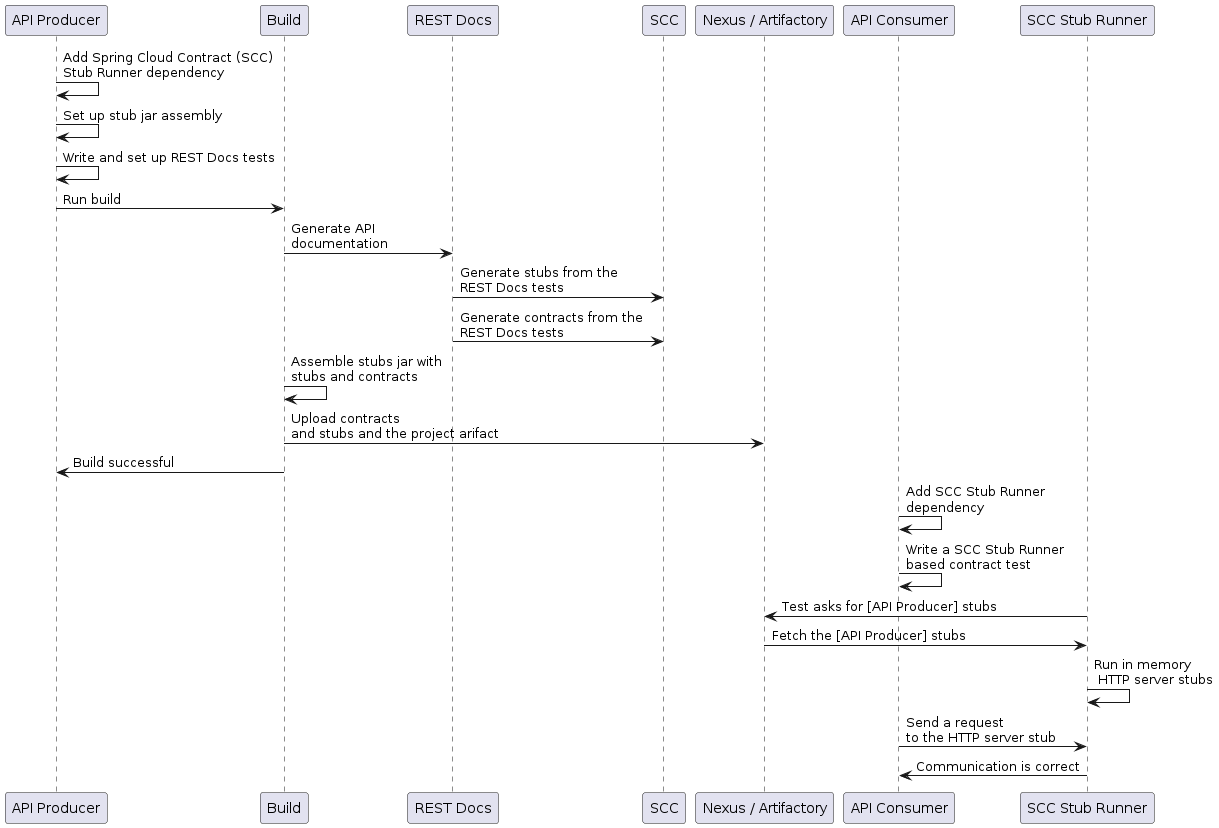
以下示例使用莫克麦克:
@RunWith(SpringRunner.class)
@SpringBootTest
@AutoConfigureRestDocs(outputDir = "target/snippets")
@AutoConfigureMockMvc
public class ApplicationTests {

	@Autowired
	private MockMvc mockMvc;

	@Test
	public void contextLoads() throws Exception {
		mockMvc.perform(get("/resource"))
				.andExpect(content().string("Hello World"))
				.andDo(document("resource"));
	}
}
该测试生成一个 WireMock 存根目标/片段/小作品/resource.json.匹配
都获取向/资源路径。WebTestClient(使用)也是同样的例子
用于测试 Spring WebFlux 应用程序)将如下:
@RunWith(SpringRunner.class)
@SpringBootTest
@AutoConfigureRestDocs(outputDir = "target/snippets")
@AutoConfigureWebTestClient
public class ApplicationTests {

	@Autowired
	private WebTestClient client;

	@Test
	public void contextLoads() throws Exception {
		client.get().uri("/resource").exchange()
				.expectBody(String.class).isEqualTo("Hello World")
 				.consumeWith(document("resource"));
	}
}
无需额外配置,这些测试创建带有请求匹配器的存根
对于HTTP方法及除主机和内容长度.以匹配
更精确地请求(例如,匹配POST或PUT的正文),我们需要
明确创建一个请求匹配器。这样做有两个效果:
-
创建一个只匹配你指定方式的存根。
-
断言测试用例中的请求也符合相同条件。
该功能的主要切入点是WireMockRestDocs.verify(),可以使用
作为文档()方便法,如下
示例如下:
import static org.springframework.cloud.contract.wiremock.restdocs.WireMockRestDocs.verify;

@RunWith(SpringRunner.class)
@SpringBootTest
@AutoConfigureRestDocs(outputDir = "target/snippets")
@AutoConfigureMockMvc
public class ApplicationTests {

	@Autowired
	private MockMvc mockMvc;

	@Test
	public void contextLoads() throws Exception {
		mockMvc.perform(post("/resource")
                .content("{\"id\":\"123456\",\"message\":\"Hello World\"}"))
				.andExpect(status().isOk())
				.andDo(verify().jsonPath("$.id"))
				.andDo(document("resource"));
	}
}前述合同规定,任何有效的POST均为身份证场接收响应
本检验定义。你可以串联调用到.jsonPath()补充一点
匹配者。如果不熟悉 JSON 路径,JayWay
文档可以帮助你快速掌握情况。该测试的WebTestClient版本
有类似的verify()静态辅助器插入同一个位置。
而不是jsonPath和内容类型方便的方法,你也可以使用
WireMock API 用于验证请求是否与创建的存根匹配,因为
以下示例展示了:
@Test
public void contextLoads() throws Exception {
	mockMvc.perform(post("/resource")
               .content("{\"id\":\"123456\",\"message\":\"Hello World\"}"))
			.andExpect(status().isOk())
			.andDo(verify()
					.wiremock(WireMock.post(urlPathEquals("/resource"))
					.withRequestBody(matchingJsonPath("$.id"))
					.andDo(document("post-resource"))));
}
WireMock API 功能丰富。你可以匹配头部、查询参数和请求体,具体为 正则表达式以及JSON路径。你可以利用这些功能创建更宽的存根 参数范围。前述示例生成了一个类似于以下示例的存根:
{
  "request" : {
    "url" : "/resource",
    "method" : "POST",
    "bodyPatterns" : [ {
      "matchesJsonPath" : "$.id"
    }]
  },
  "response" : {
    "status" : 200,
    "body" : "Hello World",
    "headers" : {
      "X-Application-Context" : "application:-1",
      "Content-Type" : "text/plain"
    }
  }
}你可以使用其中一种wiremock()方法或jsonPath()和contentType()创建请求匹配器的方法,但你不能同时使用这两种方法。 |
在消费者方面,你可以做出resource.json本节前文生成
在类路径上(例如通过以JAR形式发布存根)。之后,你可以创建一个用 WireMock 在
多种不同的方式,包括使用@AutoConfigureWireMock(stubs=“classpath:resource.json”)如前所述
公文。
使用 REST 文档生成合同
你也可以用 Spring REST 生成 Spring Cloud Contract 的 DSL 文件和文档 文档。如果你和Spring Cloud WireMock结合使用,你就能获得两个合约 还有那些小作品。
你为什么想用这个功能?社区里有人提问 关于他们希望转向基于DSL的合同定义的情况, 但他们已经有很多春季MVC测试了。利用这个功能可以生成 合同文件,你可以以后修改并迁移到文件夹(定义在你的 配置)以便插件能够找到它们。
| 你可能会好奇为什么这个功能会在WireMock模块里。功能 是因为同时生成合同和存根是合理的。 |
请考虑以下测试:
		this.mockMvc
			.perform(post("/foo").accept(MediaType.APPLICATION_PDF)
				.accept(MediaType.APPLICATION_JSON)
				.contentType(MediaType.APPLICATION_JSON)
				.content("{\"foo\": 23, \"bar\" : \"baz\" }"))
			.andExpect(status().isOk())
			.andExpect(content().string("bar"))
			// first WireMock
			.andDo(WireMockRestDocs.verify()
				.jsonPath("$[?(@.foo >= 20)]")
				.jsonPath("$[?(@.bar in ['baz','bazz','bazzz'])]")
				.contentType(MediaType.valueOf("application/json")))
			// then Contract DSL documentation
			.andDo(document("index", SpringCloudContractRestDocs.dslContract(Maps.of("priority", 1))));
前述测试生成了上一节提出的存根,同时生成两者 合同和一份文件文件。
合同称为索引.groovy并且可能类似于以下例子:
import org.springframework.cloud.contract.spec.Contract

Contract.make {
    request {
        method 'POST'
        url '/foo'
        body('''
            {"foo": 23 }
        ''')
        headers {
            header('''Accept''', '''application/json''')
            header('''Content-Type''', '''application/json''')
        }
    }
    response {
        status OK()
        body('''
        bar
        ''')
        headers {
            header('''Content-Type''', '''application/json;charset=UTF-8''')
            header('''Content-Length''', '''3''')
        }
        bodyMatchers {
            jsonPath('$[?(@.foo >= 20)]', byType())
        }
    }
}
生成的文档(此处为Asciidoc格式)包含格式化的
合同。该文件的位置为index/dsl-contract.adoc.
指定优先级属性
方法SpringCloudContractRestDocs.dslContract()需要一个可选的映射参数,允许你在模板中指定额外的属性。
其中一个属性是优先级字段,你可以指定如下:
SpringCloudContractRestDocs.dslContract(Map.of("priority", 1))覆盖DSL合同模板
默认情况下,契约的输出基于一个名为的文件default-dsl-contract-only.snippet.
你可以通过覆盖getTemplate()方法,提供自定义模板文件,具体如下:
new ContractDslSnippet(){
    @Override
    protected String getTemplate() {
        return "custom-dsl-contract";
    }
}));
上面的例子展示了这条线
.andDo(document("index", SpringCloudContractRestDocs.dslContract()));应改为:
.andDo(document("index", new ContractDslSnippet(){
                            @Override
                            protected String getTemplate() {
                                return "custom-dsl-template";
                            }
                        }));
模板的解析是通过在类路径上查找资源来解决的。以下地点按顺序检查:
-
org/springframework/restdocs/templates/${templateFormatId}/${name}.snippet -
org/SpringFramework/Restdocs/templates/${Name}.Snippet -
org/springframework/restdocs/templates/${templateFormatId}/default-${name}.snippet
因此,在上面的例子中,你应该在src/test/resources/org/springframework/restdocs/templates/custom-dsl-template.snippet